| Sitemap | Contact Us |

| NEW NEC PHONE SYSTEMS |
|
NEC Phone System Installation
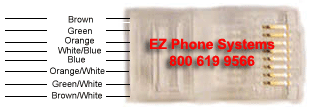
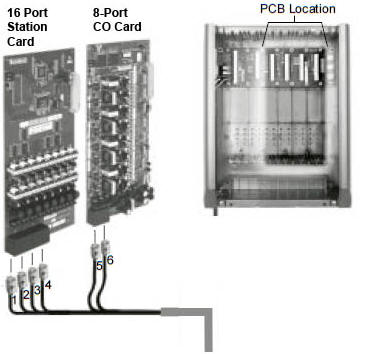
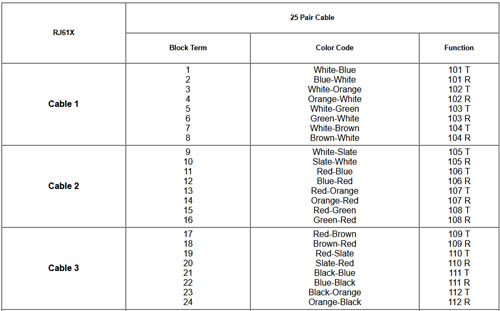
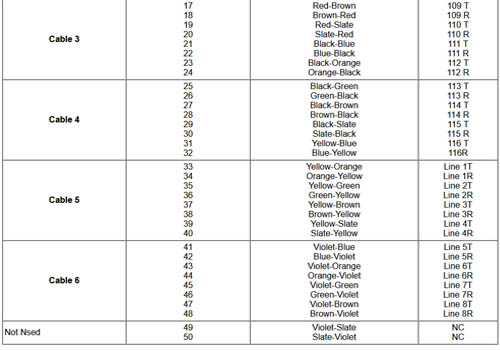
Future Comm, LLC. offers free services by phone to help with your NEC Installation. A do-it-your-selfer can perform an NEC DSX installation if the NEC EZ Installation cable connector kit is purchased. Please follow these instructions as well as your installation guide which your received with your NEC phone system starter kit. Do-it-yourself installation. The NEC EZ Installation cable connector kit makes installing ta NEC a breeze. Click on the link on the right side of the page for an exploded view of the NEC EZ Installation cable connector kit. After you have followed the instructions on this page and in the NEC installation manuals you have received with your phone system, your phone system will be ready to power up. All DSX systems are plug and play. You will be ready to send and receive phone calls. NOTE: 1 pair of wires is required on all incoming phone lines and phone extensions. A 66 Block termination punch down tool is also required for installation. Punch down the appropriate pair of wires for each terminal. For example, the 101R & 101T terminals are the terminals for the first phone extension which is extension 300, and the Line 1R and the Line 1T terminals are for the first incoming telco line witch is Line 1.
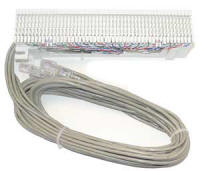
NEC EZ Installation Cable w/66 Block
$79.00 -
add to cart
Provides interface from an existing NEC DS, DSX, SL, or SV phone system to the pre-existing wiring in the building The above diagram is a schematic view of the telco 66 Block provided in the installation kit. Click here for a exploded view of a 66-Block. The installer will notice that there are 2 empty terminals on the bottom of the 66 Block. That is normal. PC Admin programming is also available for programming the NEC PC Admin with a Windows based Personal Computer. A Windows PC Computer with an available USB or Ethernet Port, PC Admin cable, and Windows computer skills are required to perform phone system programming.
|
 -
-